If you no longer wish to use ParkWhiz, you can log in to your account and remove all saved payment information.
From the website: Hover your mouse over your email address located at the top right-hand side of the page to see the main menu. Select Payment Methods.
From the app: Tap Account and then select Payment Methods.
To further prevent any future activity, our Support Team can suspend your account based on your email address. This will block all future transactions associated with that email. If you'd like us to proceed with this option, please contact us at help@parkwhiz.com.
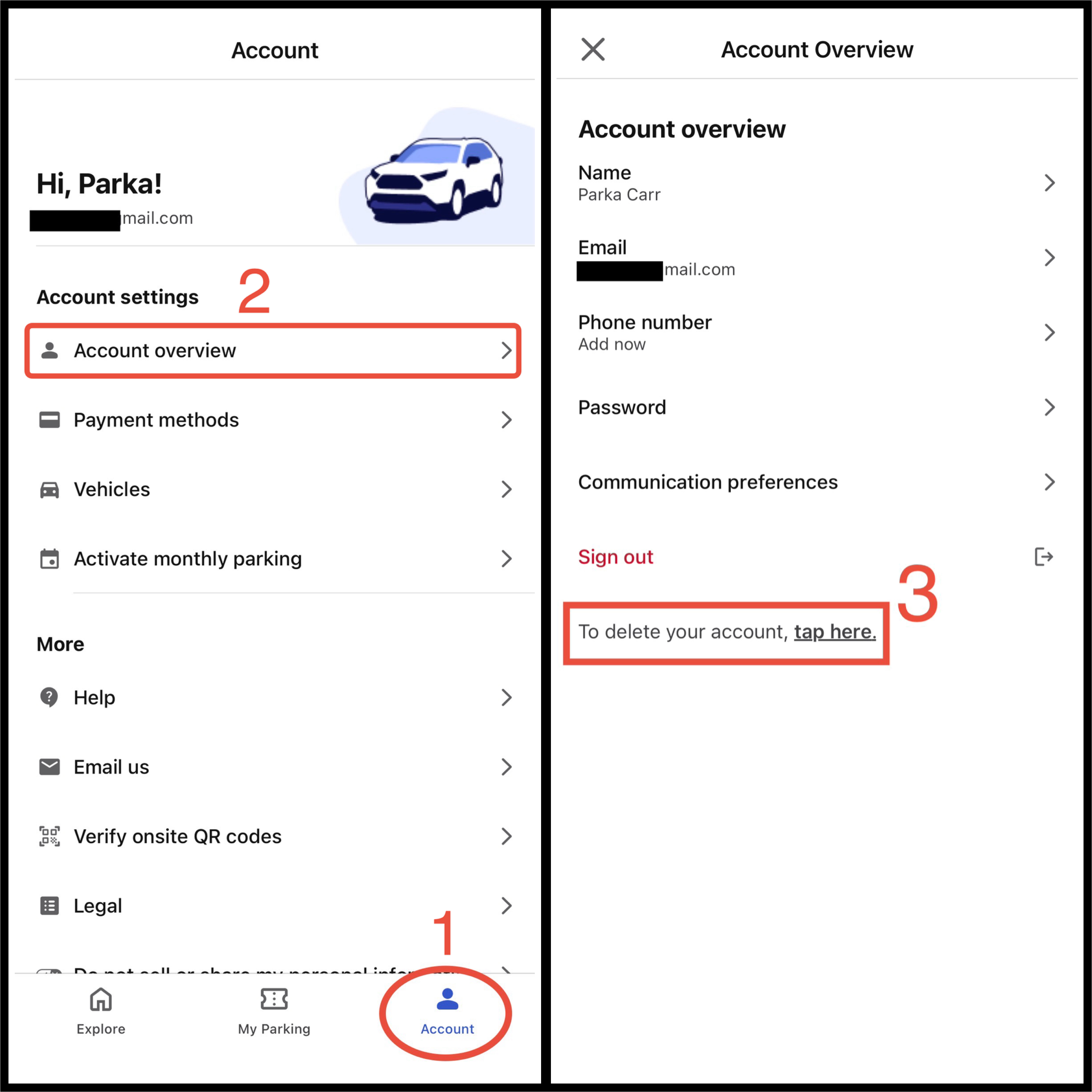
To delete your account via the ParkWhiz app:
- Log in to your account.
- Tap Account and then select Account Overview.
- Scroll to the bottom, and you should see the option to delete your account right below the red Sign Out button.
- Confirm the deletion when prompted.
Please Note:
Deleting your account is permanent. This action will erase all personal data and cannot be undone. Any active or future passes linked to your account will also be lost and cannot be recovered.
Was this article helpful?
That’s Great!
Thank you for your feedback
Sorry! We couldn't be helpful
Thank you for your feedback
Feedback sent
We appreciate your effort and will try to fix the article